// Phase alignment
Best Ways to Align Kick and Bass Phase (Free and Paid)
Polarity flips, nudges, all-pass rotators and alignment plugins all promise to fix the low end. What each one really changes, and which one fits a kick and a bass.

Short answer
The best way to align kick and bass phase depends on the bassline. If the same note sits under every kick, a free polarity flip or all-pass rotator is enough. Multi-mic aligners like Auto-Align 2 and MAutoAlign are built for one source recorded with several mics. A bass that moves under the kick needs a different rotation per beat, by hand or with a per-beat plugin.
Key takeaways
- Free fixes give you one setting for the whole track: right when the bass repeats, a compromise when it moves.
- Multi-mic aligners are built for one source, many mics, not two different sounds.
- On a rolling techno loop, eight beats needed four different angles, none of them 180°.
// How to
Three Steps, One Click
The per-beat method from this comparison, in practice: one instance on the kick, one on the bass, one click.
-
Step 01
Load it on the kick and the bass
Drop one instance on the kick channel and set it to Kick. Drop a second one on the bass channel; it links to the kick.
-
Step 02
Pick the bars, click AUTO MIX
Choose 1, 2 or 4 bars, play the loop and click AUTO MIX. Every beat is measured and the bass phase is rotated to fit the kick.
-
Step 03
Read the angle of each beat
Each cell shows the rotation and the time shift for one beat. Click a cell to edit that beat alone, and flip A/B to compare.
One setting per beat instead of one per track, measured from your own loop.
See the pluginKick and bass phase problems are easy to hear and hard to pin down. The kick sounds big in solo, the bass sounds big in solo, and together the low end goes thin on some hits and fine on others. There are several ways to fix it, from a button every DAW already has to dedicated alignment plugins, and they are not built for the same job.
This guide goes through the free methods and the paid phase alignment plugins, what each one actually changes, and which one fits a kick and a bass in electronic music. The short version: most tools give you one correction for the whole track, while a moving bassline needs a different one on almost every beat.
What Phase Alignment Has to Fix Between Kick and Bass
Kick and bass meet in the sub, usually somewhere between 40 and 120 Hz. When the kick tail and the bass note are in phase there, they add up and the hit feels solid. When they are out of phase, they cancel, and the kick loses its weight right where it should have the most.
The catch is that this relationship is not fixed. The bass under each kick can be a different note, or the same note caught at a different point in its cycle. A setting that makes beat 1 add up can make beat 3 cancel. That is why so many “fixes” seem to work on one bar and fail on the next. The full explanation is in How to Fix Phase Issues Between Kick and Bass.
Free Ways to Align Kick and Bass Phase
You can get surprisingly far with what is already in your DAW. These methods cost nothing, and every producer should know them.
Flip the Polarity
Every DAW has a polarity (often labeled phase invert) switch, usually in a utility or gain plugin or in the channel settings. It turns the bass upside down: a 180° move for the whole track. If the bass was close to 180° away from the kick, the low end suddenly fills in. If it was close to 0°, the flip makes it worse. It is a quick test, and it is the right fix only when the error is about the same on every note.
Nudge the Bass in Time
Moving the bass a few milliseconds earlier or later changes where its waveform meets the kick. It can line up one note very well. It also moves the start of every bass note, so the groove shifts, and a delay that suits a 50 Hz note is a different phase angle on a 60 Hz note. On a bassline with more than one note, a single nudge is a compromise.
Rotate the Phase With an All-Pass Filter
An all-pass filter, or a phase rotator, shifts the phase without changing the level or the timing of the notes. Many DAWs and free plugins offer one. It is more precise than a polarity flip, because you can pick any angle, not only 180°. It is still one angle for the whole track, unless you automate it note by note.
Shorten or Retrigger the Bass Notes
Sometimes the fix is in the sound itself. A synth bass with free-running oscillators starts each note at a random point in its cycle, so the phase against the kick changes every time. Retriggering the oscillators (key sync) makes every note start the same way, and shortening the bass so it starts just after the kick tail reduces the overlap. This is free and effective, but it changes the sound and the feel of the bassline. More on this in Rolling Bass Phase Problems: How to Fix Them Fast.
Paid Phase Alignment Plugins
Dedicated plugins automate the measuring part. They come from different worlds, though, and that decides what they are good at.
Sound Radix Auto-Align 2
Auto-Align 2 is built for multi-mic recordings. Its maker describes it as detecting and correcting time and phase issues between microphones in one click, with a spectral phase optimization module for phase shifts caused by filters and mic placement. It is a standard tool for drums, guitar cabinets and other sources recorded with several mics at once.
MeldaProduction MAutoAlign
MAutoAlign also targets multitrack recordings. You put an instance on each track and press a button; the instances find each other and set a delay and, if needed, a polarity flip per track. Since version 11.02 it can also compensate phase rotation per frequency across tracks. Its maker lists drum mic checks and multi-mic alignment as the main uses.
Waves InPhase
InPhase is a hands-on phase tool. You compare a track with a reference through its sidechain input, see both waveforms, set a delay and shape the phase with built-in all-pass filters while a correlation meter shows the result. Waves gives a bass DI plus amp mic as an example. It is precise and flexible, and you make every decision yourself.
Kick & Bass Auto Mix
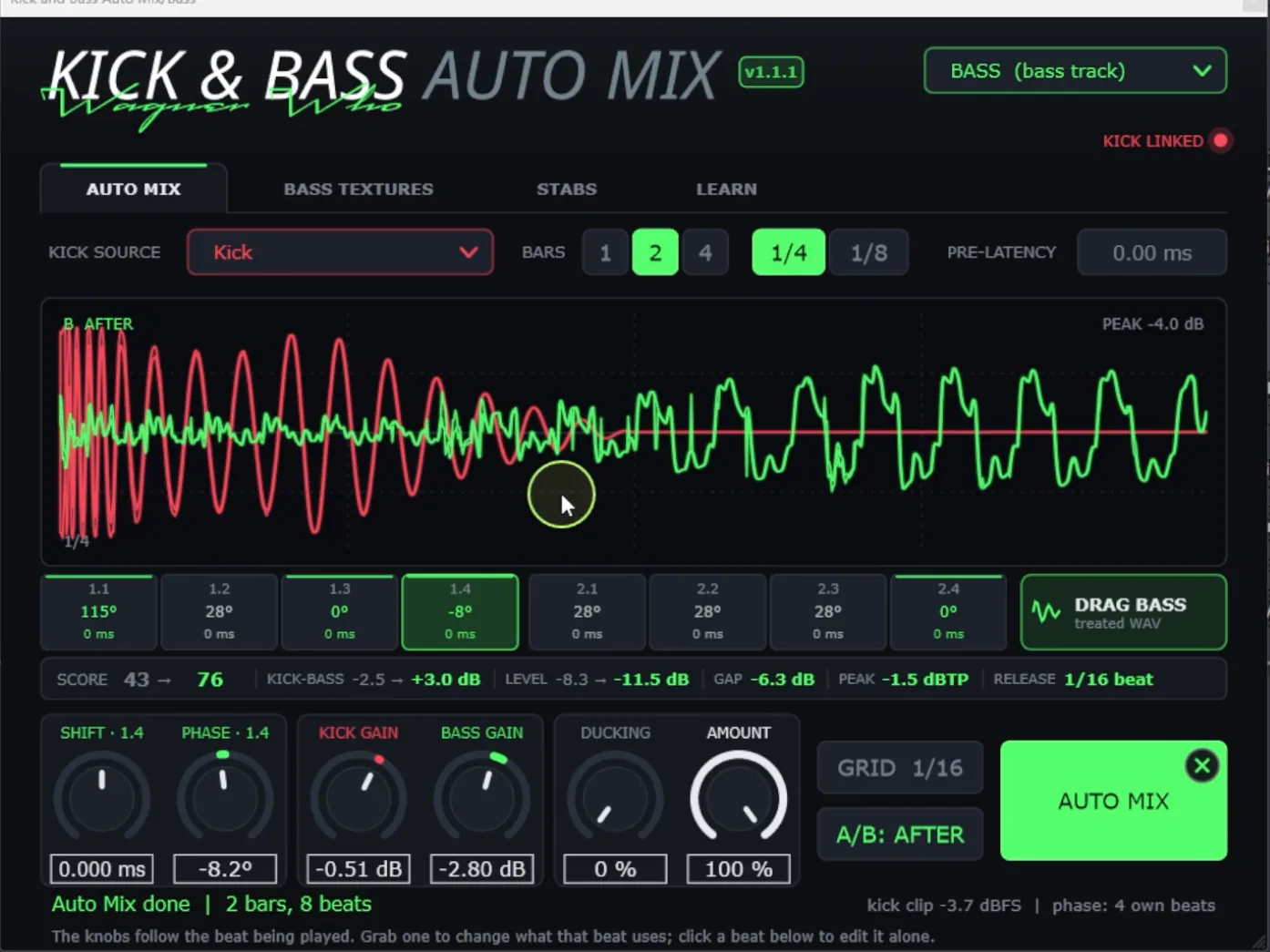
Kick & Bass Auto Mix is my own plugin, built only for this pair. One instance goes on the kick, one on the bass. You loop 1, 2 or 4 bars and press AUTO MIX: it measures every beat where the kick meets the bass and rotates the bass phase for that beat, with no time shift. The same click also sets levels, a sub-only sidechain and a mono low end. The step-by-step is in How to Align Kick and Bass Phase in One Click.
One Setting per Track vs One Setting per Beat
This is the difference that matters most for kick and bass. Multi-mic aligners solve one source captured several times: the snare in the top mic and the snare in the overheads are the same sound, so one delay and one phase correction per track can line them up. A kick and a synth bass are two different sounds, and the bass keeps changing under the kick.
Here is what that looks like on a 2-bar rolling techno loop from my own productions. These are the rotations Kick & Bass Auto Mix set on each beat, read from the plugin:
| Beat | 1 | 2 | 3 | 4 | 5 | 6 | 7 | 8 |
|---|---|---|---|---|---|---|---|---|
| Rotation | 115° | 28° | 0° | −8° | 28° | 28° | 28° | 0° |
| Time shift | 0 ms | 0 ms | 0 ms | 0 ms | 0 ms | 0 ms | 0 ms | 0 ms |
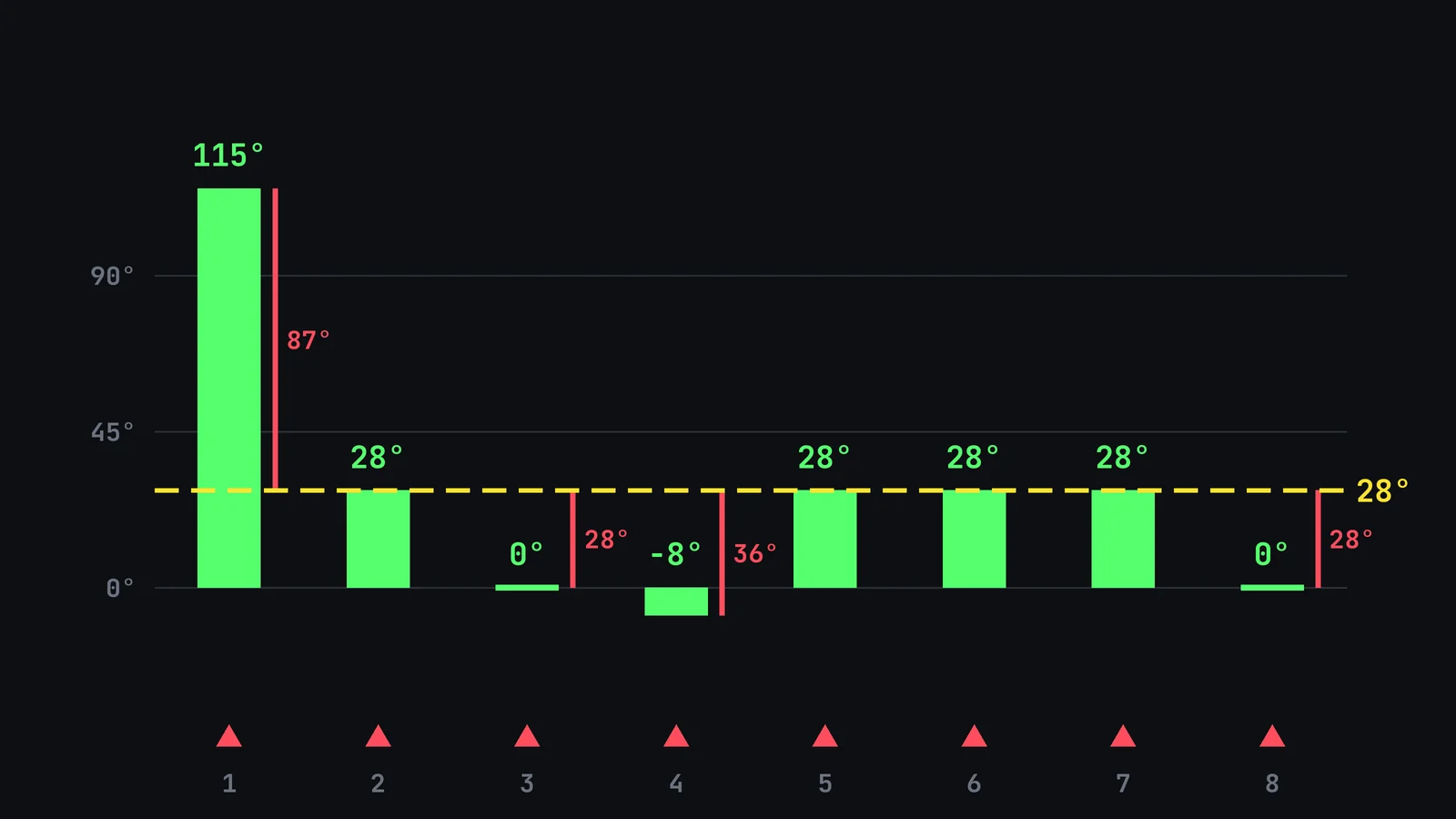
No beat needed 180°. A polarity flip would have helped beat 1 a little and made the other seven worse. A single rotation of 28°, the most common angle, would be right on four beats, about 28° off on two, 36° off on one and 87° off on beat 1. A nudge in time would move every note to get there. On a loop that repeats the same pattern under each kick, the picture is simpler: our rolling psytrance test got 121° on every beat, and one static setting would have done the job.
// Hear it
Per-Beat Alignment, Heard
Press play and flip between BEFORE and AFTER on a rolling psytrance loop. Only the phase of the bass changes, beat by beat, with the levels matched.
Which Phase Alignment Method Should You Use?
- A static bassline (the same note under every kick): try the polarity flip first, then an all-pass rotator. Free and enough.
- A bass recorded with a DI and an amp mic, or drums with many mics: a multi-mic aligner like Auto-Align 2 or MAutoAlign is made for exactly that.
- You want full manual control: InPhase, or a free rotator plus automation, and time to listen to every note.
- A synth bass that moves under the kick (rolling, offbeat, triplet lines): per-beat alignment, by hand with automation or in one click with Kick & Bass Auto Mix.
- A synth with free-running oscillators: fix the source first with key sync if the sound allows it, then align what is left.
// Manual vs one click
Free Fixes vs Per-Beat Alignment
| Manual | One click | |
|---|---|---|
| Angles | Polarity: 180° only. Rotator: any angle, one for the track | Any angle, a different one per beat |
| Groove | A nudge moves every bass note | Rotation only, 0 ms shift |
| Moving basslines | Automation, note by note | Measured per beat, shown in a cell |
| Time per loop | Minutes for a static bass, hours for a rolling one | A few seconds |
| Cost | Free, already in your DAW | A plugin built for kick and bass |
| Control | Full, by hand | Every beat editable, A/B to compare |
How to Check Kick and Bass Phase by Ear
Whatever tool you use, confirm it the same way:
- Listen in mono. Phase problems in the low end get worse in mono, and most club systems play the sub in mono.
- Solo kick and bass together and listen to the first 100 ms of each hit. A thin or hollow hit on some beats points to cancellation.
- Compare at the same level. Louder always sounds better, so match levels before deciding if a fix helped.
- Check every beat of the loop, not only the first one. The problem often hides on beats 2 and 4.
- Confirm in the full mix. Hats, percussion and reverb change how the low end feels.
Phase is only half of the low end. Once kick and bass add up, the next step is giving the kick room with a sidechain that follows it, covered in Automatic Sidechain for Kick and Bass, Synced to Tempo.
// Watch
Per-Beat Phase on Real Loops
See the per-beat method from this comparison on psytrance, techno and a triplet bassline, with the angle of every beat on screen.

Kick & Bass Mixed in ONE CLICK (Phase Alignment, Volume, Sidechain) | Kick & Bass Auto Mix VST3/AU
// Short clips
The Plugin in Short Clips
Short clips of Kick & Bass Auto Mix on real loops.
// FAQ
Questions, answered
What is the best free way to align kick and bass phase?
Start with the polarity switch in your DAW: if the low end fills in, the error was close to 180°. If it gets worse or barely changes, try a free all-pass rotator and sweep the angle while kick and bass play together. Both give one setting for the whole track, which is enough when the same bass note sits under every kick.
Do multi-mic alignment plugins work on kick and bass?
They are built for one source recorded with several microphones, where one delay and one phase correction per track lines everything up. A kick and a synth bass are two different sounds, and the bass changes under the kick from beat to beat, so one correction per track is a compromise on a moving bassline.
Is a phase rotator better than flipping polarity?
It is more precise. A polarity flip is a fixed 180° move, while a rotator can land on any angle. On our rolling techno loop no beat needed 180°, so a rotator gets closer. Both still apply one angle to the whole track unless you automate it.
Does aligning phase change the timing of my bass?
It depends on the method. Nudging the bass or adding a delay moves every note. A polarity flip or a phase rotation keeps the notes where they are. Per-beat rotation in Kick & Bass Auto Mix shows 0 ms of time shift on every beat.
Should I align phase before or after the sidechain?
Align first. If kick and bass cancel, a deeper sidechain only hides the problem by removing more bass. With the phase aligned, the bass that stays under the kick adds to it, and the duck can be lighter. AUTO MIX sets both in the same click, phase first.
Do I still need phase alignment if my synth bass is retriggered?
Often less, not always. Key sync makes every note start the same way, but different notes still meet the kick at different angles. Check each beat in mono: if some hits still go thin, align what is left.
// Kick & Bass Auto Mix
Align Kick and Bass on Every Beat
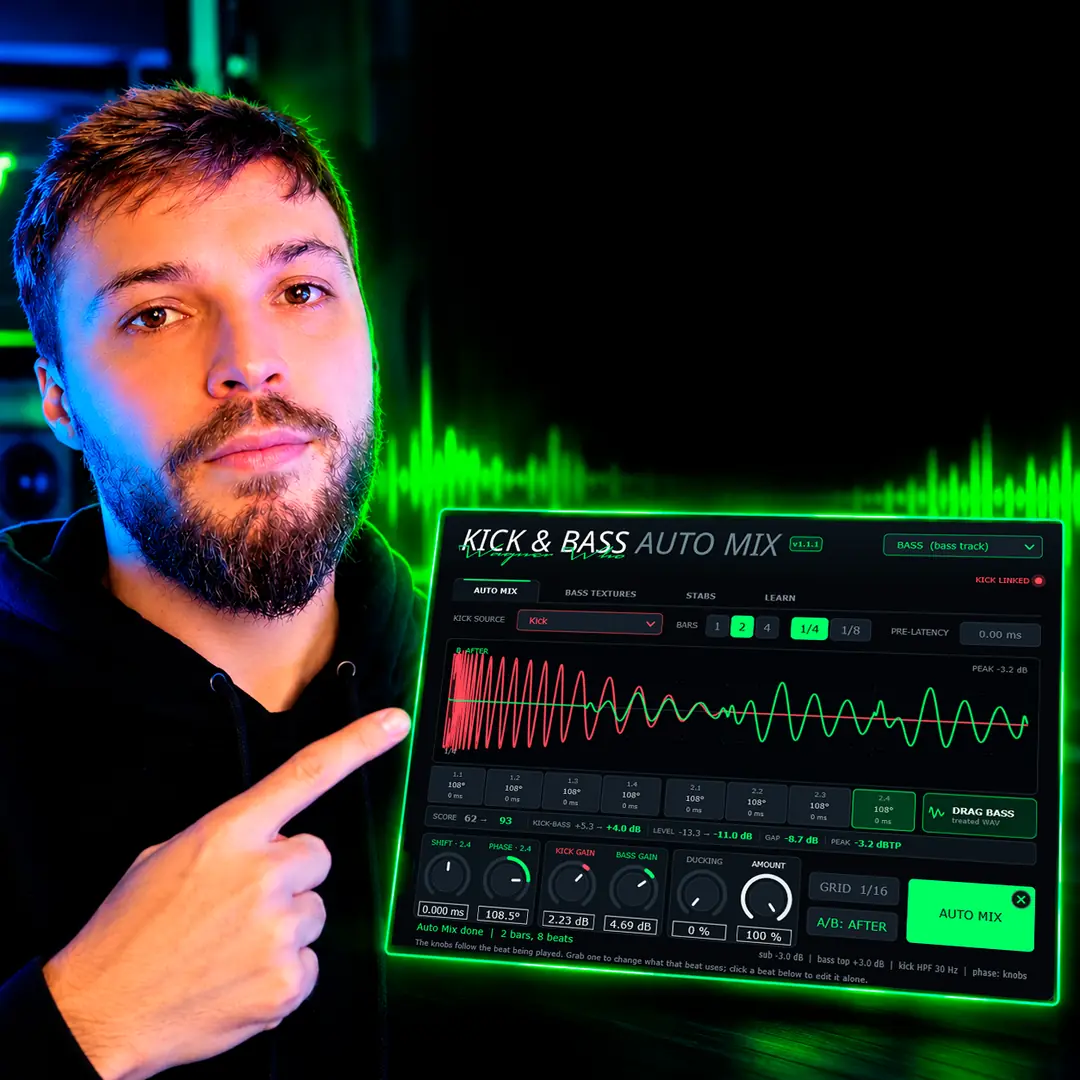
Kick & Bass Auto Mix measures each beat and rotates the bass phase to fit the kick, without moving the groove.
See the plugin
// About the author
// Keep reading