// Rolling bass
Rolling Bass Phase Problems: How to Fix Them Fast
Why a 16th-note bassline makes the kick fade on some beats only, what the manual fixes can and cannot do, and the per-beat fix that keeps the groove.

Short answer
A rolling bass meets the kick at a different phase on every beat, so some kicks cancel and others do not. Retrigger the oscillators, shorten the notes under the kick and keep the ducking light, then rotate the bass phase separately for each kick, with no time shift. Re-check in mono with the sidechain on.
Key takeaways
- The kick fades on some beats because the bass arrives at a different phase on each one.
- One polarity flip or one rotation fixes one beat at best.
- Rotate the phase per beat, never shift the bass in time: the roll stays on the grid.
// How to
The Per-Beat Fix in One Click
The beat-by-beat fix for a rolling bassline, done by the plugin from a few bars of your loop.
-
Step 01
KICK on the kick, BASS on the bass
One instance per track. The BASS instance listens to both and finds the rotation for every kick.
-
Step 02
Choose the bars, press AUTO MIX
Loop 1, 2 or 4 bars of the roll and press AUTO MIX. Every beat gets its own angle, with no time shift.
-
Step 03
Count the beats again
Flip A/B and listen to every kick of the bar. Keep it, edit one beat, lower AMOUNT or undo with the X.
Every note of a rolling bass meets the kick at its own angle. Kick & Bass Auto Mix sets each one.
See the pluginThe first kick of the bar hits hard. The second one is fine. The third goes soft, as if somebody pulled it back a few dB, and the fourth comes back. Nothing changed in the kick, and nothing is clipping. What changed is the rolling bass underneath it: on every beat, it meets the kick at a different point of its cycle.
Rolling basslines are the hardest case for kick and bass phase. A steady sub note can be fixed with one setting; a bass that plays a new note on every 16th cannot. This guide explains why, what the manual fixes can and cannot do, and how to fix the phase beat by beat, with before and after readouts on a psytrance loop and a techno loop.
The Symptom: the Kick Fades on Some Beats Only
With a rolling bass, phase problems rarely sound like a constantly thin low end. They sound uneven. Listen for these signs, with the kick and the bass soloed together:
- Some kicks lose weight and others do not, in a pattern that repeats every bar or every two bars.
- The kick sounds fine in solo and only fades when the bass plays.
- The weak beats move when you change the tempo or transpose the bassline.
- Mono makes it worse. Club systems and phones play the low end in mono, so the weak beats get weaker there.
To hear it clearly, sum both tracks to mono and put a low-pass filter at about 150 Hz on them. Loop one bar and count the beats out loud: you will hear which ones drop.
Why Rolling Basslines Are the Hardest Case for Phase
The kick tail is a low sine wave, usually settling between 45 and 65 Hz. The bass sits in the same octave. When the two waves move in the same direction they add up; when they move in opposite directions they cancel. Engineers call the point of each wave in its cycle its phase. With a rolling bass, that relationship is different under every kick, for three reasons.
The Bass Note Restarts Under Every Kick
In a rolling pattern the bass usually rests on the kick and plays the three 16ths after it, or plays all four 16ths with the first one ducked. Either way, a new note starts right under the kick tail on every beat. Each note start is a new phase relationship. If the bassline changes pitch from beat to beat, so does the relationship: a note at 49 Hz and a note at 55 Hz drift against the same kick tail at different speeds.
Free-Running Oscillators Drift Against the Kick
Many synths let the oscillator run freely instead of starting each note at the same point of its cycle. Then the phase of the bass under the kick depends on how many cycles fit between two kicks. It is simple math: at 142 BPM one beat lasts 423 ms, and a 55 Hz oscillator completes 23.24 cycles in that time. The leftover 0.24 of a cycle means the bass arrives 86° later on every kick: 0°, 86°, 172°, 259°. If beat 1 is in phase, beat 3 is almost exactly opposite, and that kick fades.
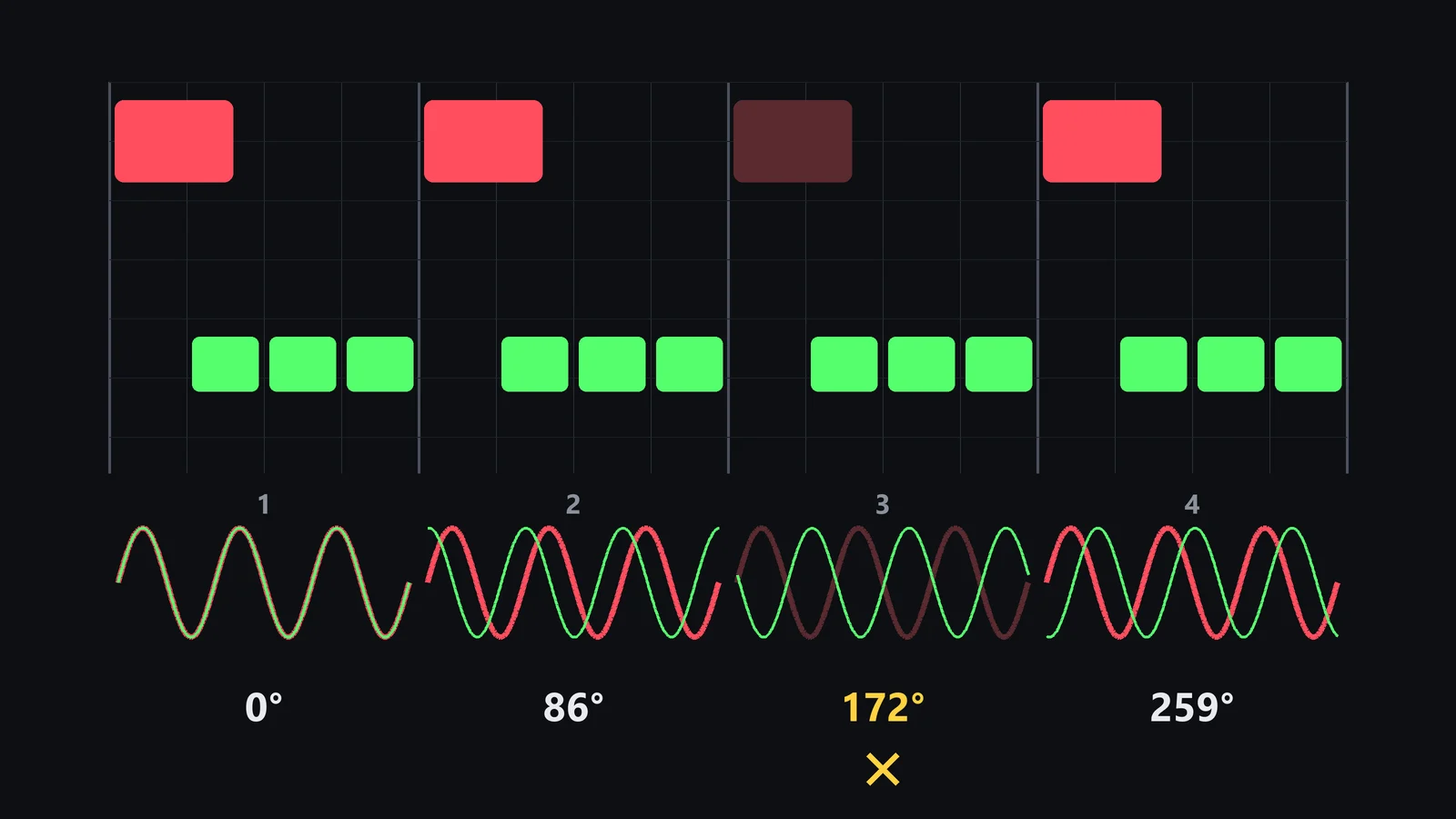
Change the tempo and the pattern changes. At 145 BPM the same oscillator moves 273° per beat; at 125 BPM it moves 144°. That is why a rolling bass that sounded fine at one tempo can lose kicks at another.
The 16th Grid Leaves Almost No Gap
A 16th note lasts 106 ms at 142 BPM and 120 ms at 125 BPM. Many psytrance and techno kicks have a tail of 150 to 250 ms. So the kick tail does not overlap one bass note but two or three of them. Shortening the bass notes or ducking the bass helps, but there is no clean gap where the kick can play alone, as there is with a long sub note that starts after the kick.
Manual Fixes for Rolling Bass Phase and Their Limits
Each of the classic fixes solves part of the problem. None of them aligns every beat on its own.
Retrigger the Oscillator Phase
Most synths have a phase setting per oscillator, with a switch between a fixed start point (retrigger) and a free or random start. Retrigger makes every note start at the same point of its cycle, which removes the drift from the previous section. It is the first thing to try on a rolling bass.
The limit: a fixed start point is not the right start point. If every note starts at an angle that cancels the kick, every beat now cancels the same way. And when the bassline changes notes, each pitch still lines up with the kick tail differently. Retrigger turns random weak beats into predictable ones; it does not make them strong.
Shorten the Bass Notes Under the Kick
Moving the first bass note off the kick, or shortening it, reduces the overlap. It works well when the kick has a short tail. With a long tail, the second and third 16ths still meet it, and cutting too much changes the roll itself: the groove of a rolling bass is in those notes.
Sidechain Ducking Alone
Ducking lowers the bass while the kick plays, so there is less of it to cancel. It does not change the phase of what is left. With a fast tempo and a short release, the bass comes back while the kick tail is still sounding, and the beats that cancelled before still cancel, just a little less. Ducking deep enough to hide it also hides the roll.
One Polarity Flip or One Rotation for the Whole Track
A polarity flip turns the bass 180°. A phase rotator turns it by any angle. Both apply the same angle to every beat. In the free-running example above, a flip that fixes beat 3 breaks beat 1. One angle works only when every beat has the same problem, which on a rolling bass is the exception.
How to Fix Rolling Bass Phase Beat by Beat
The fix that holds up is a different phase rotation for each kick, with no shift in time. Rotation changes where the bass is in its cycle without moving it on the grid, so the roll keeps its exact position against the kick. By hand, the method looks like this:
- Retrigger the oscillators so the pattern is the same every time it repeats.
- Bounce the bass to audio and cut it at each kick, so every beat is its own clip.
- Put a phase rotator on each clip (or on a copy of the track per beat) and sweep it while you loop that beat, until the kick has the most weight.
- Check the joins. A rotation that changes suddenly between clips can click; short crossfades help.
- Check again in mono and with the sidechain on, since ducking changes which part of the bass meets the kick.
It works, and it is slow: one sweep per beat, on every loop of the track. For the general method on any bassline, see How to Fix Phase Issues Between Kick and Bass, Step by Step.
Rolling Bass Phase Before and After: Psytrance and Techno
Here are two real loops from my own productions, run through Kick & Bass Auto Mix, which does the per-beat rotation automatically. The plugin measures the bars you choose and shows one cell per beat with the rotation it gave that beat and the time shift (always 0 ms). Its SCORE compares eight measures of the low end with reference ranges. The numbers below are the plugin’s own readouts.
Rolling Psytrance at 142 BPM
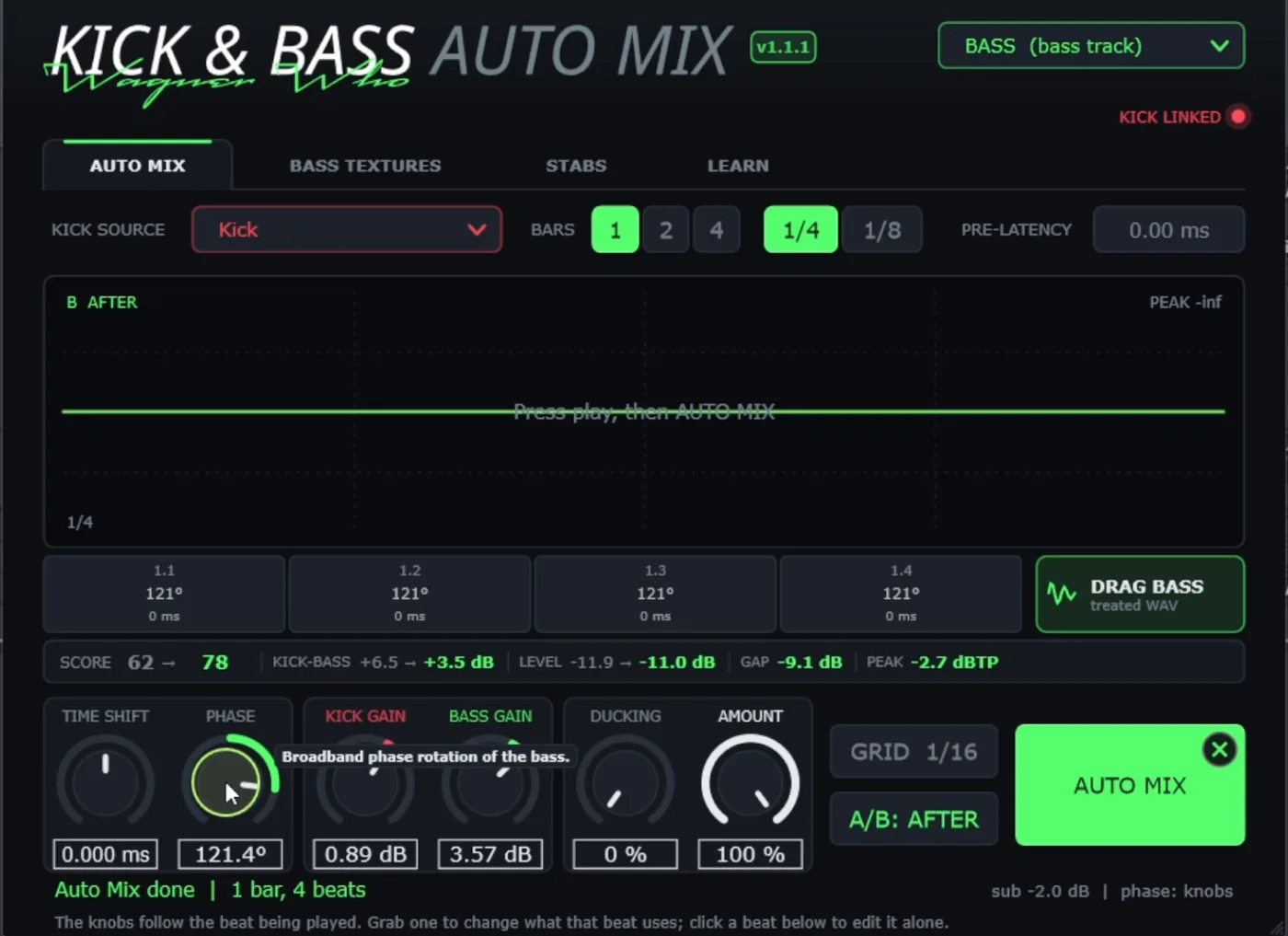
A classic rolling psytrance bass, one bar measured. Here the bass pattern repeats exactly on every beat, so every beat had the same problem and all four cells landed on the same rotation: 121°. The SCORE went from 62 to 78. This is the case where one angle for the whole loop would have worked too, if you found 121° by ear. A polarity flip (180°) would have missed it by 59°.
Rolling Techno at 125 BPM
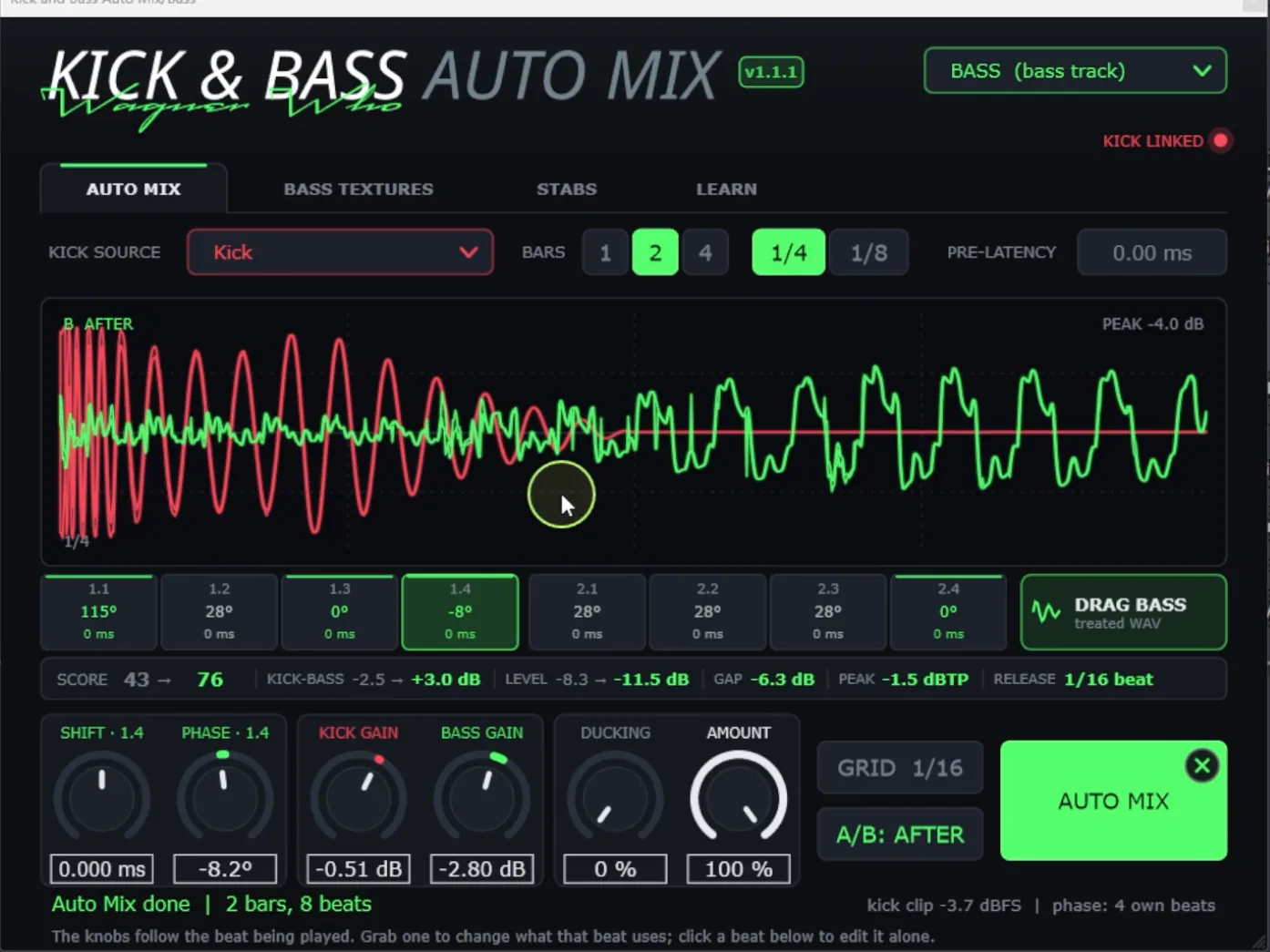
A rolling techno bass, two bars measured. This bassline does not repeat on every beat, and the cells show it: 115°, 28°, 0° and −8° in the first bar, 28°, 28°, 28° and 0° in the second. The SCORE went from 43 to 76. No single angle covers this loop: 28° fits four beats, but beat 1.1 needed 115° and three beats needed almost nothing. This is exactly the bassline where the kick fades on some beats only.
To hear the difference on a rolling bass, use the player above: it switches between BEFORE and AFTER with the levels matched, so only the phase changes.
// Hear it
Rolling Bass, Before and After
Press play and flip between BEFORE and AFTER on a rolling psytrance bass. Only the phase of the bass changes, with the levels matched, so what you hear is the cancellation going away.
// Real data
What changed in our test loop
86°
Drift per beat of a free-running 55 Hz bass at 142 BPM
106 ms
One 16th note at 142 BPM: shorter than most kick tails
115° to −8°
Best rotation across 8 beats of one rolling techno loop
0 ms
Time shift: the roll keeps its place against the kick
What to Check After Fixing the Phase
Aligning the phase is the core of the fix, not the whole of it. Before you move on, check three things.
Duck Depth and Release
With the phase aligned, the bass no longer fights the kick, so you often need less ducking than before. Too much and the roll loses its first note; too little and the bass masks the kick attack. Watch the gap after the kick (the techno loop above ended at −6.3 dB, the psytrance loop at −9.1 dB) and keep the release short and synced to the tempo, around a 16th. The automatic mixing guide covers the sidechain settings in detail.
Kick Tail Length
The longer the kick tail, the more bass notes it overlaps, and the more the result depends on phase. If the tail runs past the second 16th, try shortening it or fading it earlier. Then measure again, because a shorter tail changes the best angle.
The Same Check in Mono, in the Full Mix
Fix in solo, confirm in the full mix and in mono. Keep the bass mono below about 120 Hz, then loop a full bar and count the beats again. Every kick should land with the same weight.
// Manual vs one click
By Hand vs One Click
| Manual | One click | |
|---|---|---|
| Oscillator drift | Retrigger, then check every beat | Measured on the beats you play |
| Rotation | Cut the bass per beat, sweep each clip | Measured, one angle per beat |
| Timing | Risk of nudging the roll | 0 ms shift, the groove stays |
| Sidechain | Set by ear, deep enough to hide it | Below 130 Hz, release synced, checked together |
| Mono | Utility plugin, re-check | Bass mono below 120 Hz |
| Time per loop | One sweep per beat, every loop | A few seconds, then your ears decide |
Fix Rolling Bass Phase in One Click
The per-beat fix is measurable, so a plugin can run it. Kick & Bass Auto Mix listens to 1, 2 or 4 bars, finds a rotation for every kick with no time shift, sets a sidechain only below 130 Hz with a release synced to the tempo, and keeps the bass mono below 120 Hz. A safety rule means no beat can end up cancelling more than 1.5 dB more than your original tracks. You can grab a cell to change one beat, lower AMOUNT, or undo with the X.
For the per-beat phase alignment explained step by step, see How to Align Kick and Bass Phase in One Click. The tool does the measuring; your ears still decide if the roll serves the track.
// Watch
Rolling Basslines Fixed on Screen
The walkthrough shows the beat-by-beat fix on a rolling psytrance bass, then on techno and a triplet bassline.

Kick & Bass Mixed in ONE CLICK (Phase Alignment, Volume, Sidechain) | Kick & Bass Auto Mix VST3/AU
// Short clips
The Kick Comes Back, in Short Clips
Short clips of the same fix on real loops.
// FAQ
Questions, answered
Should I retrigger the oscillator phase?
Yes, it is the first step on a rolling bass. Retrigger makes every note start at the same point of its cycle, so the pattern stops drifting. It does not choose the right point, though, and notes of different pitch still meet the kick differently, so check every beat afterwards.
Is ducking enough on a rolling bass?
Usually not. Ducking lowers the bass under the kick but does not change its phase. At fast tempos the bass comes back while the kick tail is still sounding, and ducking deep enough to hide the cancellation also hides the roll.
Does the fix change with the tempo?
Yes. With a free-running oscillator, the number of cycles between two kicks depends on the tempo, so the phase under each kick changes too. A 55 Hz bass drifts 86° per beat at 142 BPM and 144° at 125 BPM. Measure again after a tempo change.
Why does the kick disappear on some beats only?
Because the bass arrives at a different phase under each kick. Where it is close to opposite the kick tail, the two cancel and that kick fades; where it is close to in phase, the kick hits. The pattern repeats with the bassline.
Can I fix rolling bass phase by moving the bass in time?
It can line up one beat, but it moves the whole roll against the kick and changes the groove. Phase rotation changes where the bass is in its cycle without moving it on the grid.
Can a plugin fix rolling bass phase automatically?
Yes. Kick & Bass Auto Mix finds a rotation for every kick with no time shift, sets the sidechain below 130 Hz and keeps the bass mono below 120 Hz. You can edit any beat, and your ears still decide.
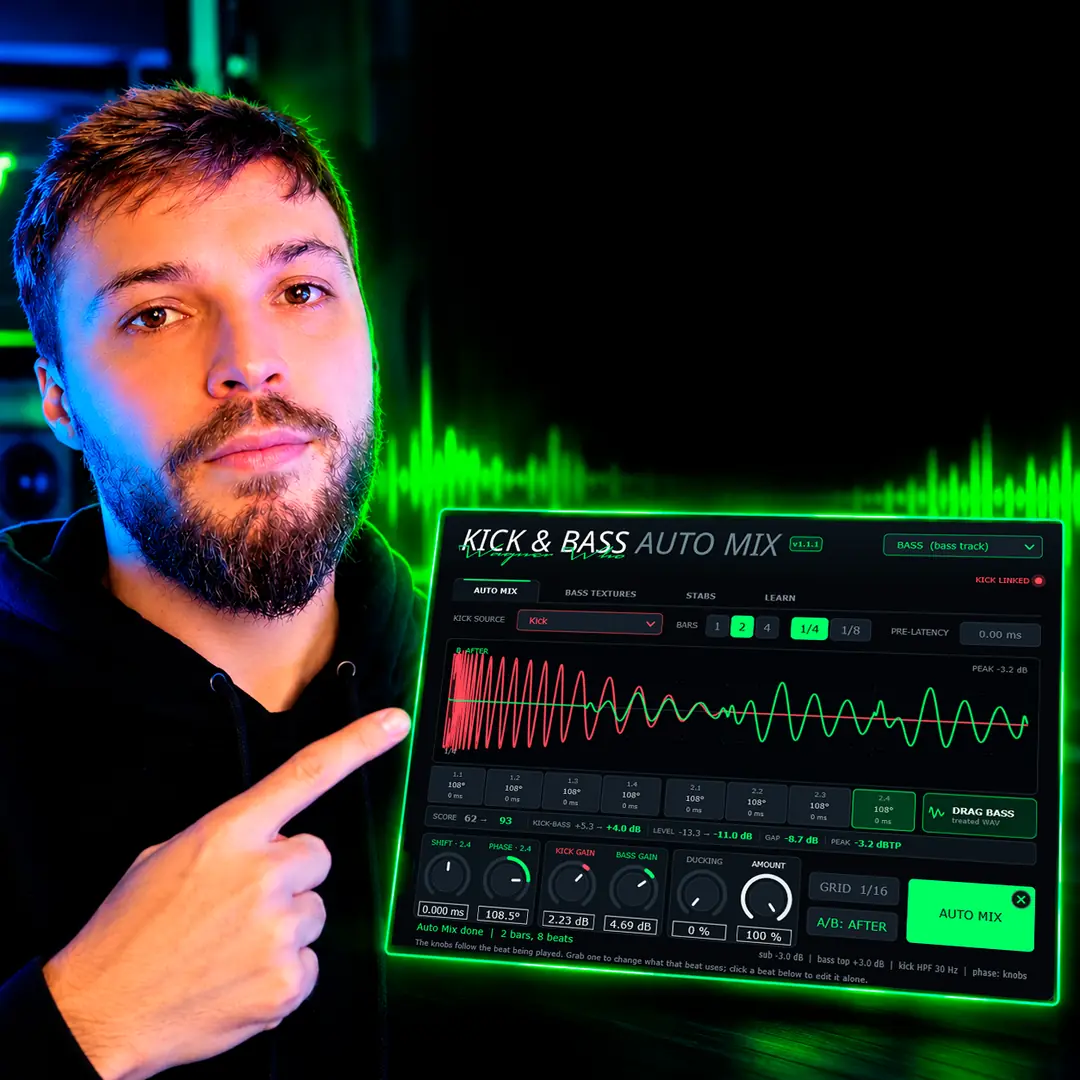
// Kick & Bass Auto Mix
Every kick lands, even over a rolling bass
Kick & Bass Auto Mix finds the rotation for each kick, with no time shift, and you keep the final word.
See the plugin
// About the author
// Keep reading