
Fix your kick & bass in one click →
// New plugin: VST3 · AU
Kick and Bass,
Mixed in One Click
Phase alignment, volume and sidechain fixed on both tracks automatically. Then add two extra layers that follow your bass notes: a mid bass and stabs.
Formats
VST3 & AU on Mac
VST3 on Windows
Works in
Ableton Live, FL Studio, Logic,
Cubase, Bitwig and more
License
Lifetime license
Works offline
Works in ▸ Ableton Live ✦ FL Studio ✦ Logic Pro ✦ Cubase ✦ Bitwig ✦ Reaper ✦ Works in ▸ Ableton Live ✦ FL Studio ✦ Logic Pro ✦ Cubase ✦ Bitwig ✦ Reaper ✦ Works in ▸ Ableton Live ✦ FL Studio ✦ Logic Pro ✦ Cubase ✦ Bitwig ✦ Reaper ✦
Works in ▸ Ableton Live ✦ FL Studio ✦ Logic Pro ✦ Cubase ✦ Bitwig ✦ Reaper ✦ Works in ▸ Ableton Live ✦ FL Studio ✦ Logic Pro ✦ Cubase ✦ Bitwig ✦ Reaper ✦ Works in ▸ Ableton Live ✦ FL Studio ✦ Logic Pro ✦ Cubase ✦ Bitwig ✦ Reaper ✦
// Hear the difference
Kick and Bass, Before and After
Hit play, then flip between BEFORE and AFTER. Same loop, level-matched, and the only thing that changes is the plugin.
Level-matched, phase-aligned, extra layers added. No other plugins on the chain, just Kick & Bass Auto Mix doing the work.
$37
+ tax where applicable
🔒 Lifetime license · Full support · Secure checkout via Gumroad
// How it works
What Kick & Bass Auto Mix Actually Does
Four steps from a muddy low end to a mix-ready one.
Step 01
Click AUTOMIX
One click phase-aligns kick and bass, balances their levels and applies a smart sidechain.
Step 02
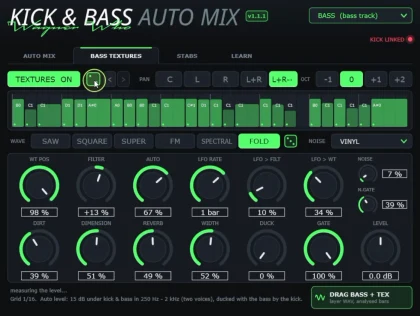
Add bass textures
The plugin reads your bass notes and adds a second layer that follows them: a mid bass from its built-in synth.
Step 03
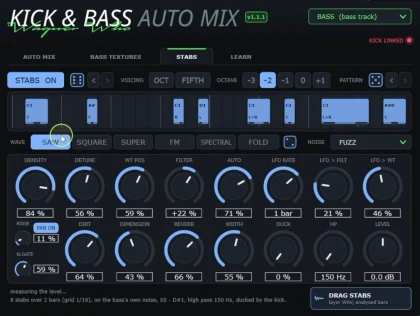
Add stabs
Want more movement? Switch on a third layer: stabs that follow the same notes.
Step 04
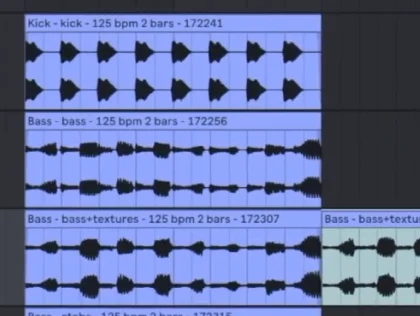
Drag & drop export
Export each layer separately. Just drag it from the plugin straight into your project.
// See it in action
Real sessions, real workflows
Short clips straight from the DAW. Swipe through and watch the low end lock in.
// Under the hood
Kick and bass phase alignment, sidechain and balance in one plugin
Kick & Bass Auto Mix is a VST3 and AU plugin that phase-aligns, balances and sidechains your kick and bass, then adds two layers on top.
Fix
Phase, beat by beat
Every bass note meets the kick differently, so it fixes each beat on its own. It rotates the phase and never moves your groove.
Fix
Club-ready levels
Balances kick and bass to the ranges measured on professional club loops.
Fix
Ducking from your real kick
The duck follows the kick itself, not a drawn curve, and only touches the sub. The mids stay alive.
Fix
A safe low end
Mono below 120 Hz, and every layer under −1 dBTP. AMOUNT, A/B and undo on every change keep you in control.
Add
Bass textures
Wavetable layers that follow your bass notes: wide on top, mono underneath.
Add
Stabs + 4 exports
Stabs generated on your bass notes, in your groove, already mixed. Drag kick, bass, textures and stabs out as 32-bit float WAV, cut to the exact bars.
// FAQ
Questions, answered
Can I get a refund?
There's no license key or activation. The plugin is fully unlocked the moment you download it, and it keeps working even after a refund. Because of that, all sales are final.
The one exception: if the plugin won't open in your DAW and we can't solve it together, you'll get a full refund.
Please watch the videos and listen to the before/after examples on this page before buying. They show exactly what the plugin does.
Which DAWs does it work in?
It's tested in Ableton Live, FL Studio, Cubase, Reaper and Bitwig, and the AU version passes Apple's auval validation for Logic Pro. It runs in any DAW that loads VST3 or AU plugins. There's no AAX version, so it doesn't work in Pro Tools.
Mac or Windows?
Both. You get VST3 for Windows and macOS, plus AU for macOS, with signed installers on both systems (the Mac one is also notarized by Apple).
Windows 10 or 11 (64-bit), or macOS 11 or later on Apple Silicon or Intel.
Is it a subscription?
No. It's a one-time payment. Your license covers up to 3 computers and includes free updates within version 1.x.
Do I need to be online to use it?
No. It's 100% offline: no account, no internet connection and no data collected.
How do I get the plugin after buying?
Checkout runs on Gumroad. Right after payment you get the download link on the receipt page and by email.
How do I install it?
Mac: open the .pkg installer.
Windows: run the installer (.exe). It puts the plugin in the right VST3 folder for you.
Then rescan plugins in your DAW.
Does it add latency?
The BASS instance reports about 80 ms, because precise phase rotation down to 30 Hz needs to look ahead. Your DAW compensates for it automatically. The KICK instance has zero latency.
Will it change my groove or timing?
No. It rotates the phase of each beat and never moves your notes. Your groove stays exactly where you put it.
// Ready when you are
Stop fighting your low end.
Get Kick & Bass Auto Mix with a lifetime license and full support.