
// Auto mix
How to Mix Kick and Bass Automatically
Phase, levels, sidechain, a mono low end and a safe peak, set from your own loop in a few seconds, plus an optional mid bass and stabs. Hear it first.

Short answer
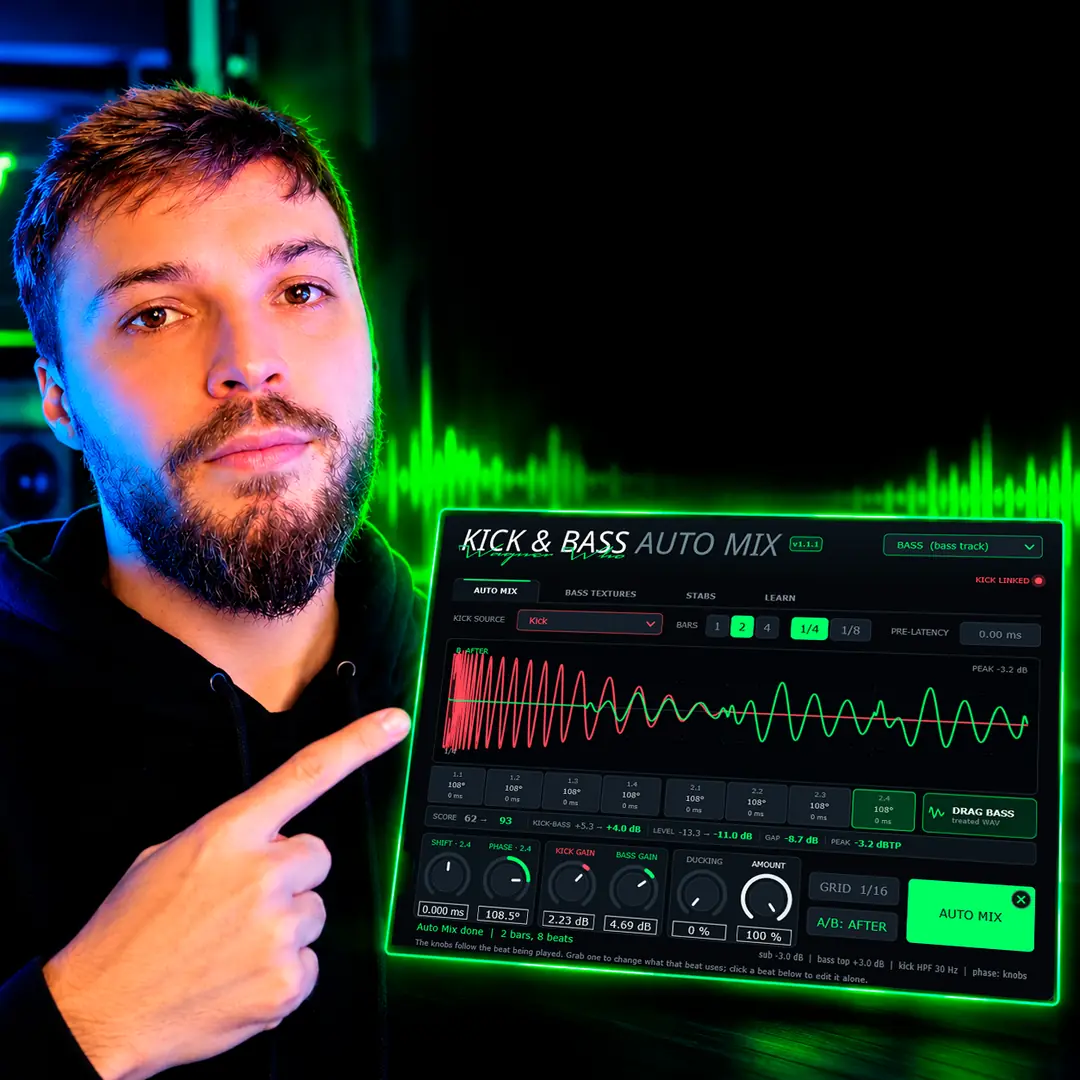
To mix kick and bass automatically, put one instance of Kick & Bass Auto Mix on the kick and one on the bass, choose the bars that matter and press AUTO MIX. It measures the loop and sets levels, a sub-only sidechain, tone, a mono low end, phase per beat and a −1 dBTP ceiling.
Key takeaways
- One click sets levels, sidechain, tone, mono and phase from your own loop.
- Three very different loops ended in the same place: the kick about 3 dB over the bass, the pair near −11 dBFS.
- Two extras, a mid bass and stabs, are generated from your own bass notes.
// How to
Three Steps, One Click, Two Extras
The whole automatic mix of kick and bass, from loading the plugin to the exported WAV files.
-
Step 01
KICK on the kick, BASS on the bass
One instance per track. The KICK instance adds no latency; the BASS instance listens to both and does the mixing.
-
Step 02
Choose the bars, press AUTO MIX
Loop 1, 2 or 4 bars and press AUTO MIX. Every beat is measured and the result is applied in a few seconds.
-
Step 03
Compare, then drag the WAVs out
Flip A/B, set AMOUNT or undo with X. When you like it, drag the treated kick and bass into your project.
-
Extra step
Add a mid bass with BASS TEXTURES
Switch TEXTURES ON: wavetable voices follow your bass notes and add a wide mid-bass layer over a mono sub. Roll the dice or shape the sound.
-
Extra step
Add stabs that follow the bassline
Switch STABS ON: short hits written from your bass notes, mixed into the groove and ducked by the kick. Change the pattern, density and voicing.
Phase per beat, levels, a sub-only sidechain and a mono low end, all set from your own loop in one click.
See the pluginYou have a kick that hits and a bass that rolls, and together they still don’t sound like a finished record. You could spend the evening on gain staging, a sidechain compressor, an EQ on the sub, a polarity check and a limiter. Or you could let one plugin measure the loop and set all of it in a few seconds, then decide with your ears whether you keep it.
Below are the real readouts from three sessions (psytrance, high-tech minimal and techno), what exactly changed, how to do it, and the two extra layers that turn a clean low end into a full one.
Before and After on Three Real Loops
These are the readouts exactly as the plugin showed them after one click. Nothing was tweaked afterwards. Very different starting points, the same destination: the kick about 3 dB over the bass, the pair near −11 dBFS, room for the kick after every hit, and peaks under −1 dBTP.
High-tech minimal, 125 BPM, 2 bars

The bass was louder than the kick (KICK-BASS −2.5 dB) and the pair was too hot at −8.3 dBFS. The plugin brought the kick down 0.95 dB and the bass down 3.45 dB, which put the kick 3 dB on top and freed 3.6 dB of headroom. The bass moves under the kick, so the phase changed on almost every beat: 73°, 3°, 131°, 131°, −1°, −126°, −8° and −126°.
| High-tech minimal | Before | After |
|---|---|---|
| SCORE | 61 | 81 |
| KICK-BASS | −2.5 dB | +3.0 dB |
| LEVEL | −8.3 dBFS | −11.9 dBFS |
| GAP (after) | −10.4 dB | |
| PEAK (after) | −1.5 dBTP | |
| Phase per beat (after) | 7 beats with their own angle | |
Psytrance, 142 BPM, 1 bar
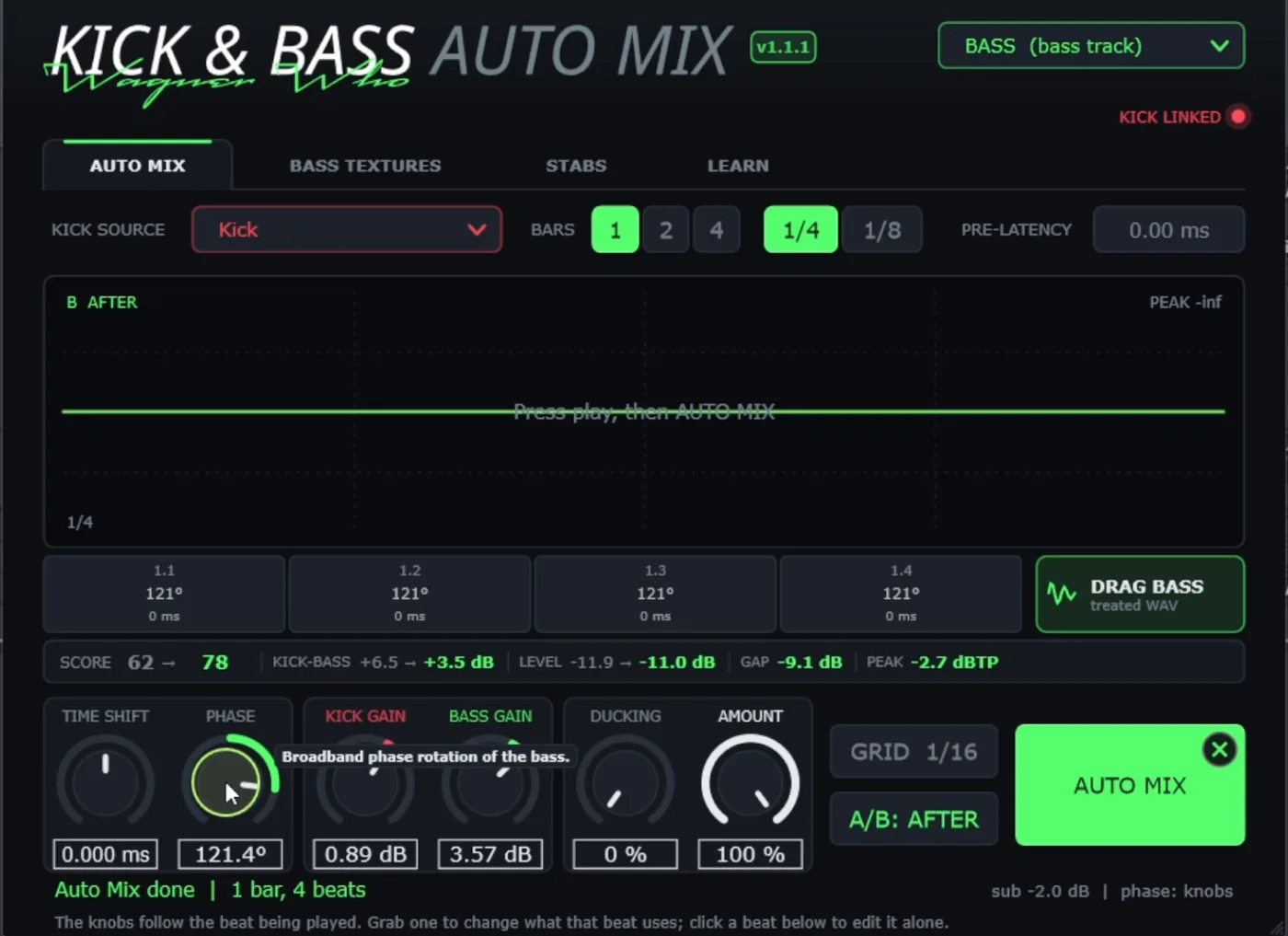
The opposite problem: the kick was too far over the rolling bass. The plugin raised the bass 3.57 dB and the kick 0.89 dB, landing KICK-BASS at +3.5 dB, with a gentle −2 dB shelf on the sub. Every beat received the same 121° rotation, because the bass repeats the same pattern under each kick.
| Psytrance | Before | After |
|---|---|---|
| SCORE | 62 | 78 |
| KICK-BASS | +6.5 dB | +3.5 dB |
| LEVEL | −11.9 dBFS | −11.0 dBFS |
| GAP (after) | −9.1 dB | |
| PEAK (after) | −2.7 dBTP | |
| Phase per beat (after) | 121° on all 4 beats | |
Techno, 125 BPM, 2 bars
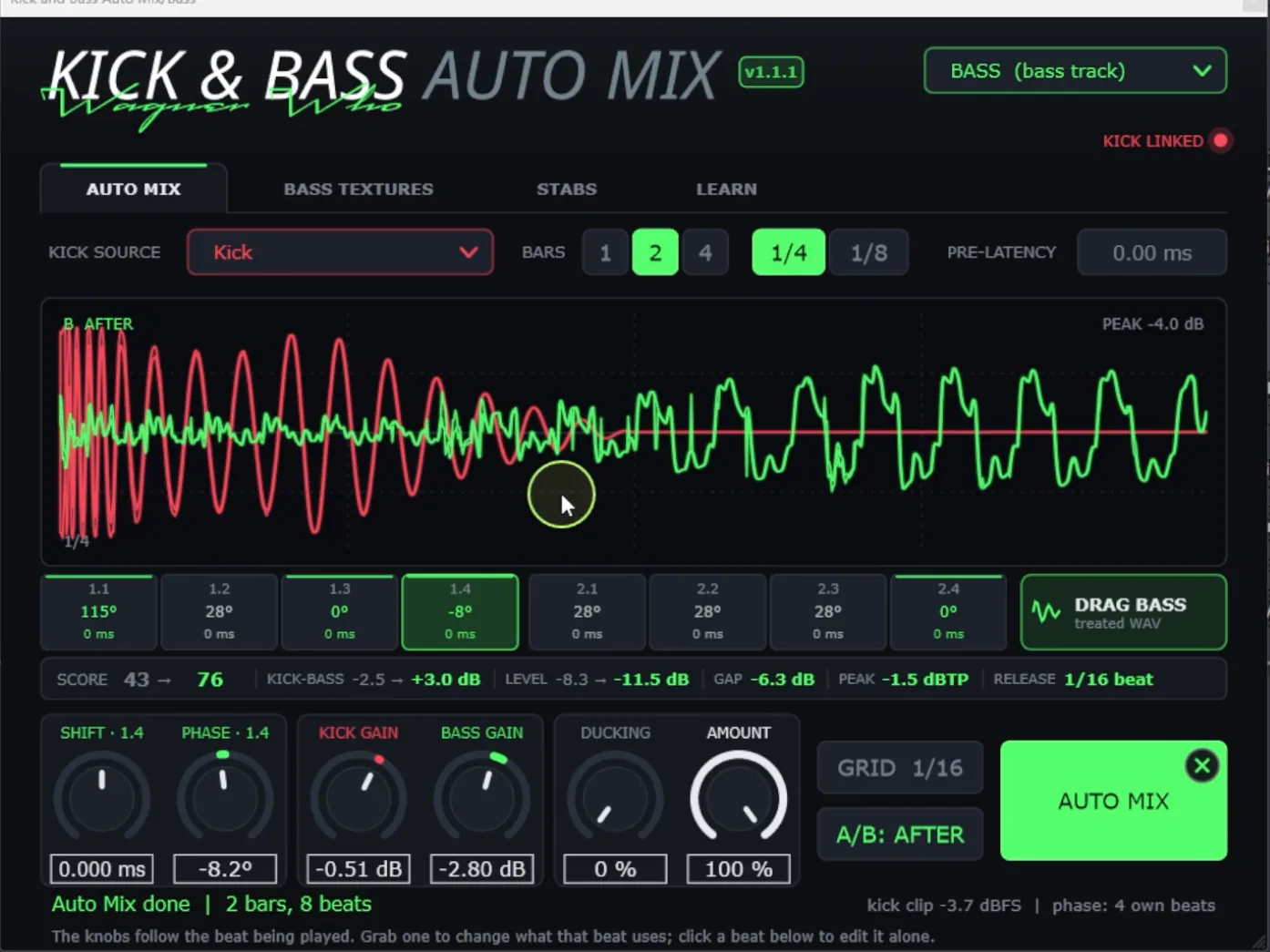
The lowest starting score of the three. The bass sat over the kick and the pair ran hot. After AUTO MIX the kick was 3 dB on top, the sum came down to −11.5 dBFS, and four beats got their own phase angle (115°, 28°, 0° and −8°) while the others shared one.
| Techno | Before | After |
|---|---|---|
| SCORE | 43 | 76 |
| KICK-BASS | −2.5 dB | +3.0 dB |
| LEVEL | −8.3 dBFS | −11.5 dBFS |
| GAP (after) | −6.3 dB | |
| PEAK (after) | −1.5 dBTP | |
| Phase per beat (after) | 4 beats with their own angle | |
// Hear it
Three Loops, Before and After
Press play and flip between BEFORE and AFTER. AFTER is one AUTO MIX plus a BASS TEXTURES mid-bass layer. Both go through the same master chain, so listen to the low end, not the overall loudness.
What Gets Set When You Mix Kick and Bass Automatically
Kick & Bass Auto Mix listens to the bars you choose and sets six things, all measured on renders through its own processing, so the numbers describe what you hear:
- Levels. The kick lands about 3 dB RMS over the bass (accepted range 2.5 to 4 dB), and kick plus bass sit around −11 dBFS RMS together. Each track is measured only where it plays, so silence between notes does not fool the meter.
- Sidechain. Only the bass below 130 Hz ducks under each kick, from 0 to 24 dB. The duck follows the real kick signal, not a drawn curve, and its release is synced to the tempo. The bass above 130 Hz keeps its level, so the groove stays audible.
- Tone. A small low shelf shared by kick and bass, a balance between the bass sub and its top (up to ±3 dB), and a 30 Hz high-pass on the kick only when its deep rumble is clearly too loud.
- Mono low end. If the bass has stereo content below 120 Hz, that part is folded to mono. The kick is left as it is.
- Phase per beat. Each kick gets its own phase rotation of the bass, with no time shift. The full story is in how to align kick and bass phase in one click.
- Peak ceiling. The kick, the bass and their sum stay at or below −1 dBTP. If needed, peaks are soft-clipped a little; if that is not enough, the level stays below target instead of going over the ceiling.
Two safety rules sit on top. No beat is allowed to cancel more than 1.5 dB more (30 to 150 Hz, under the kick) than the plain level-matched tracks, and if nothing scores better than your original, nothing changes.
How to Mix Kick and Bass Automatically, Step by Step
1. KICK on the kick, BASS on the bass
Load one instance on the kick channel and set it to KICK. It adds no latency. Load a second instance on the bass channel and set it to BASS: this is the one that listens to both tracks and does the mixing. It adds about 80 ms of latency, which your DAW reports and compensates. Work on audio tracks when you can (bounce MIDI synths in place first); if something before the plugin adds latency, type that total into PRE-LATENCY.
2. Choose the bars and press AUTO MIX
Loop the section where kick and bass play the way they will in the drop, choose 1, 2 or 4 bars and press AUTO MIX. The plugin listens to those bars, analyses every beat and applies the result in a few seconds.
3. Listen, compare, keep or undo
Press play and flip A/B: the kick track switches on the same beat, so you compare like for like. If you want less of the result, lower AMOUNT. If you don’t want it at all, the X on the AUTO MIX button undoes it and returns to your settings.
// Watch
The Full Mix on Real Loops
Every setting from this guide in one walkthrough: AUTO MIX, the SCORE, BASS TEXTURES, STABS and the exports, on psytrance and techno loops.

Kick & Bass Mixed in ONE CLICK (Phase Alignment, Volume, Sidechain) | Kick & Bass Auto Mix VST3/AU
Extra Steps: Add a Mid Bass and Stabs
Once the kick and bass sit right, two more tabs unlock. They are optional, but this is where a clean low end turns into a full one. Both read the notes of your bass, so whatever they add stays in key and in time with your groove.
BASS TEXTURES: a mid-bass layer that follows your notes
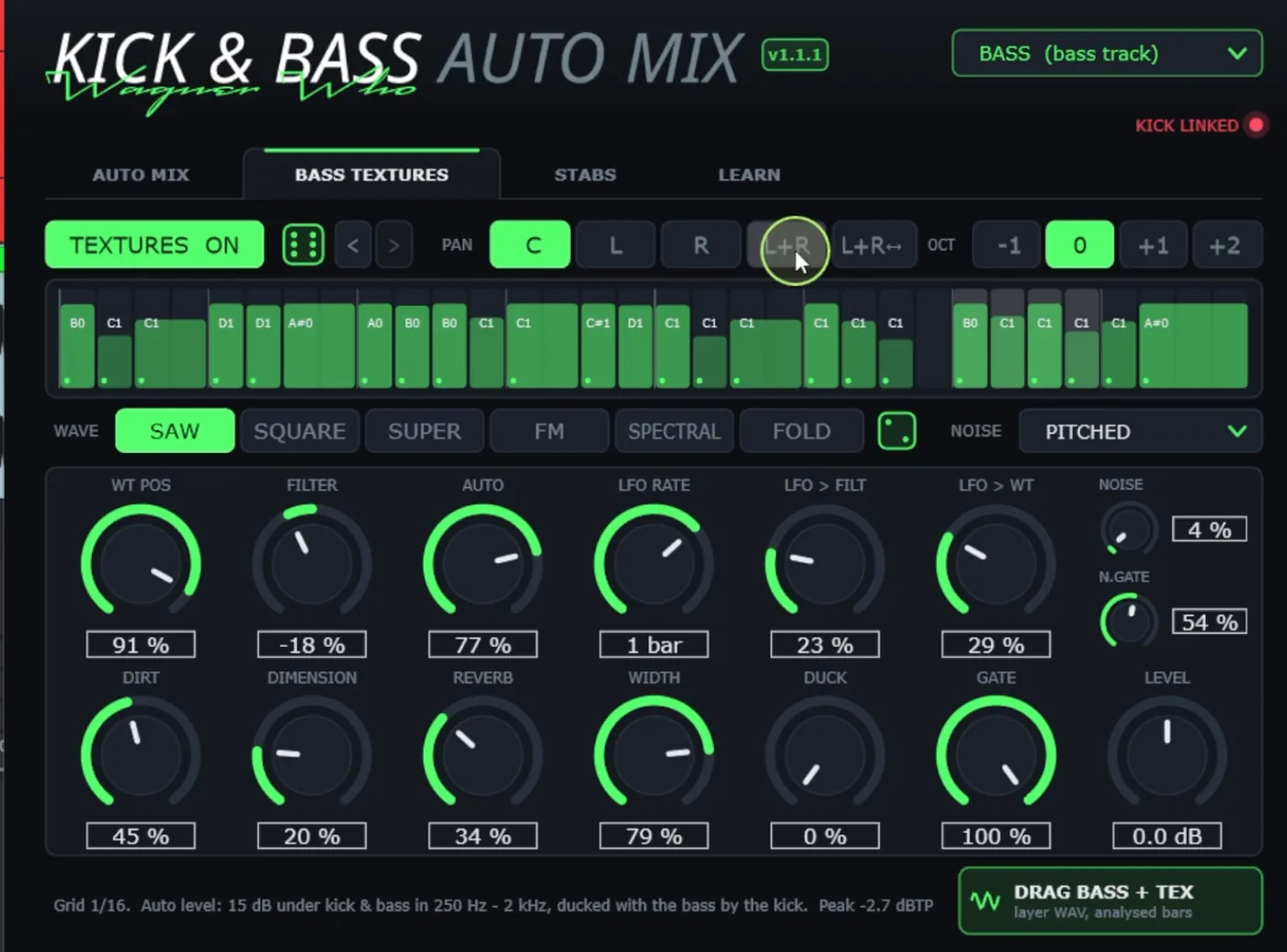
Switch TEXTURES ON and the plugin plays wavetable voices on top of your bass, following its notes and velocities step by step. The layer is wide on top and mono underneath, so it adds size without touching the mono sub, and while it plays, the root bass above 130 Hz is turned down to make room. Press the dice for a new sound, or shape it yourself:
- WAVE: the oscillator shape (SAW, SQUARE, SUPER, FM, SPECTRAL or FOLD), plus WT POS to scan the wavetable.
- FILTER, AUTO and the LFO: the brightness, how much it moves on its own, and an LFO you can send to the filter or the wavetable position.
- NOISE and DIRT: grit and air layered on top.
- DIMENSION, REVERB and WIDTH: the space and the stereo spread.
- GATE, DUCK and LEVEL: how long each note rings, how much it ducks under the kick, and how loud the layer sits.
- PAN and OCT: where the layer sits in the stereo field and which octave it plays.
Here is a mid-bass layer on the techno loop, with the same kick and bass underneath:
STABS: short hits generated from the bassline
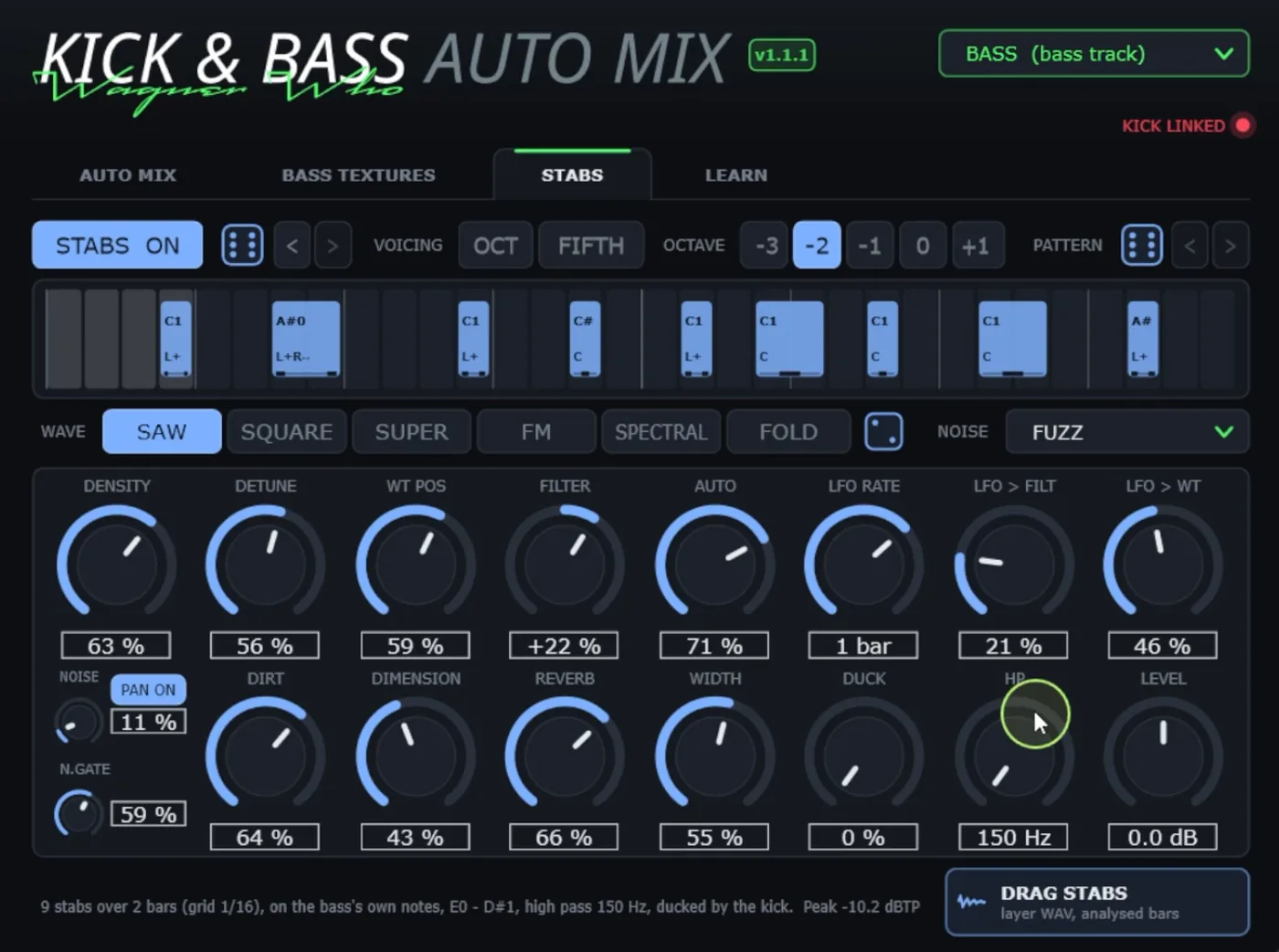
Switch STABS ON and the plugin writes short stab hits from your bass notes and mixes them into the groove. VOICING chooses octaves or fifths, OCTAVE sets the register, DENSITY adds or removes notes, and the stabs have their own DUCK so they breathe with the kick. The dice next to STABS ON rolls a whole new stab layer (pattern, wave and sound), while the PATTERN dice changes only where the stabs play.
Export everything as separate layers
When you like the result, drag the treated kick and bass out of the plugin as 32-bit float WAV files, cut to the analysed bars. Together, those two exports rebuild the mix without the plugin. The bass with its textures and the stabs export the same way, so you can free the CPU, send stems to a collaborator, or keep building the track on top.
Reading the Score
After AUTO MIX, the readout shows each value before and after. Green means inside the target range.
| Readout | What it tells you |
|---|---|
| SCORE | 0 to 100. The average of 8 low-end measures compared with reference ranges measured on professional club loops. 100 means every measure is inside its range. |
| KICK-BASS | How much louder the kick is than the bass (RMS, in dB). Target about +3 dB. |
| LEVEL | Kick and bass together (RMS). Target −11 dBFS. |
| GAP | How far the sub drops right after the kick, relative to the bass plateau: the room the sidechain makes for the kick. |
| PEAK | True peak of the result, kept at −1 dBTP or lower. |
| RELEASE | The sidechain release, in beats, shown when a sidechain was applied. |
The score is a guide, not a grade for your track. It tells you whether the kick and bass relationship sits where finished club records usually sit. Your ears still decide.
AMOUNT and A/B: the Decision Stays Yours
AMOUNT sets how much of the whole AUTO MIX you hear, from 0 % (your original kick and bass) to 100 %. It scales the levels, the sidechain, the tone, the mono and the phase together. If the result feels a little too polished for the track, try 60 or 70 % to keep part of the original character.
A/B switches between the original (BEFORE) and the mix (AFTER), with the kick track switching on the same beat. Listen at the same volume and in the context of the full track, not only the solo loop.
After AUTO MIX you can still fine-tune: the phase knobs and the beat strip change the rotation globally or for a single beat, and DUCKING adds a manual, LFO-style pump on the whole bass if you want an audible pumping effect. AUTO MIX never sets DUCKING for you.
// Manual vs one click
By Hand vs AUTO MIX
| Manual | One click | |
|---|---|---|
| Levels | Faders and meters, checked by ear | Kick about 3 dB over the bass, pair near −11 dBFS |
| Sidechain | Routing, a compressor and a release set by ear | Sub only (below 130 Hz), driven by the real kick, release synced to tempo |
| Phase | Polarity flip or one rotator setting | A rotation for every beat, 0 ms time shift |
| Mono and peaks | Utility plugins and a limiter | Bass mono below 120 Hz, everything at or under −1 dBTP |
| Time per loop | From half an hour to an evening | A few seconds |
| Control | Full, by hand | AMOUNT, A/B, per-beat knobs and undo |
When Automatic Is the Wrong Tool
- Distortion is the point. If the kick and bass are meant to smash into each other (hard techno, some industrial sounds), a clean balance may remove the very thing you were after.
- The bass should fight the kick. Some grooves rely on the bass pushing against the kick on purpose. Use a lower AMOUNT or skip it.
- The sounds clash in pitch. No level or phase setting fixes a kick tail tuned a semitone away from the bassline. Tune the kick first.
- Only part of the track was analysed. The per-beat phase applies to the bars you analysed; the rest of the track uses the dominant setting. If another section has a different bassline, run AUTO MIX on that section too.
If you want to mix kick and bass in one click and keep every decision reversible, that is exactly what Kick & Bass Auto Mix was built for.
// Short clips
The Mix in Short Clips
Quick looks at the same workflow: before, one click, after.
// FAQ
Questions, answered
Does automatic mixing replace my ears?
No. It gives you a measured starting point in seconds: levels, sidechain, tone, mono and phase. You still listen, compare with A/B, scale the result with AMOUNT or undo it. The final call is yours.
Will it move my groove or timing?
No. The phase alignment is a rotation, not a time shift, so every note starts where you programmed it. The sidechain only ducks the bass below 130 Hz, so the part of the bass you hear as groove keeps its level.
Does it work on any genre?
It is made for electronic low ends: techno, house, high-tech minimal, psytrance and similar. It measures the relationship between kick and bass, not a genre style. If a track depends on the kick and bass clashing on purpose, use a lower AMOUNT or skip it.
Can I undo it?
Yes. The X on the AUTO MIX button undoes the last AUTO MIX and returns to your settings before it, up to 16 steps back. AMOUNT at 0 % also gives you the original kick and bass.
Does it add latency?
Only on the BASS instance, about 80 ms, which your DAW reports and compensates. The KICK instance adds none. If plugins before it add latency, enter their total in PRE-LATENCY, or bounce those tracks to audio first.
What do I get when I export?
32-bit float WAV files of the kick and the bass, cut to the analysed bars, with the treatment you hear. Together they rebuild the mix without the plugin. BASS TEXTURES and STABS export the same way if you use them.
// Kick & Bass Auto Mix
Mix Kick and Bass in One Click
Kick & Bass Auto Mix sets phase, levels and sidechain from your own loop, and you keep the last word.
See the plugin
// About the author
// Keep reading
