// Kick and bass clash
Why Your Kick and Bass Clash (and How to Fix It)
Muddy, weak or disappearing low end? The seven real reasons kick and bass clash, how to hear each one, and the fix for every case.

Short answer
Kick and bass clash when they fight for the same space in the low end. The seven usual causes are wrong phase, a kick out of key, a bass too loud in the sub, no ducking, a stereo sub, a long kick tail over a rolling bass, and too much 200 to 400 Hz on both. Each one sounds different, so name the symptom first and fix phase and level before anything else.
Key takeaways
- A clash has seven usual causes, and most mixes have two or three at once.
- Fix phase and level first: they change how every other fix sounds.
- On a high-tech minimal loop the bass sat 2.5 dB over the kick; after one AUTO MIX the kick led by 3.0 dB.
// How to
Three Steps, One Click
Four of the seven causes in this guide (phase, level, ducking and a stereo sub) are checked and fixed in one pass.
-
Step 01
Load it on the kick and the bass
Drop one instance on the kick channel and set it to Kick. Drop a second one on the bass channel; it links to the kick.
-
Step 02
Choose the bars, press AUTO MIX
Loop 1, 2 or 4 bars and press AUTO MIX. Every beat is measured and the result is applied in a few seconds.
-
Step 03
Compare, then drag the WAVs out
Flip A/B, set AMOUNT or undo with X. When you like it, drag the treated kick and bass into your project.
Phase per beat, kick over bass, a sub-only sidechain and a mono low end, from your own loop in one click.
See the pluginThe kick sounds great on its own. The bass sounds great on its own. Play them together and the low end turns to mud, the kick loses its punch, or it seems to disappear every time the bass comes in. That is a clash, and it is the most common low end problem in electronic music.
A clash is not one problem. It has seven usual causes, and each one sounds a little different. This guide shows how to hear which cause you have, and the fix for each one, from phase and level to ducking, stereo, tuning, tails and the mud between 200 and 400 Hz.
The Symptom Checklist
Loop the busiest bar of the track, solo kick and bass together, and listen for these:
- The kick gets thinner when the bass plays, even though neither track got quieter. Start with cause 1.
- The low end wobbles or pulses on long notes, like a slow tremolo. Look at cause 2.
- The bass sounds bigger than the kick and the kick feels like a click on top. Check cause 3.
- The kick is there, but blurred, with no clear gap after each hit. Check cause 4.
- The low end changes in mono or on a club system. Check cause 5.
- The groove feels heavy and slow on a rolling bassline. Check cause 6.
- Everything sounds boxy, even at low volume. Check cause 7.
Most clashes mix two or three of these. Fix them in the order below: phase and level first, because they change how every other fix sounds.
1. Same Note, Wrong Phase
Kick and bass meet in the sub, roughly between 40 and 120 Hz. When the kick tail and the bass note overlap, their angle decides what you hear. Near 0° they add up and the hit feels solid. Near 180° they cancel and the kick loses weight, even if both tracks are loud.
The quick test: solo both in mono, press the Ø button on the bass, and compare. If one version is clearly fuller, keep it. If neither is, the angle sits somewhere in between, and the Ø button cannot reach it. On a rolling psytrance loop from my own productions, every beat needed a rotation of 121°. On a high-tech minimal loop, the eight beats needed eight different angles, from −126° to 131°.
The difference between the Ø button and a real phase rotation is covered in Polarity vs Phase: What the Ø Button Really Does, and the per-beat fix in How to Align Kick and Bass Phase in One Click.
2. Kick Out of Key
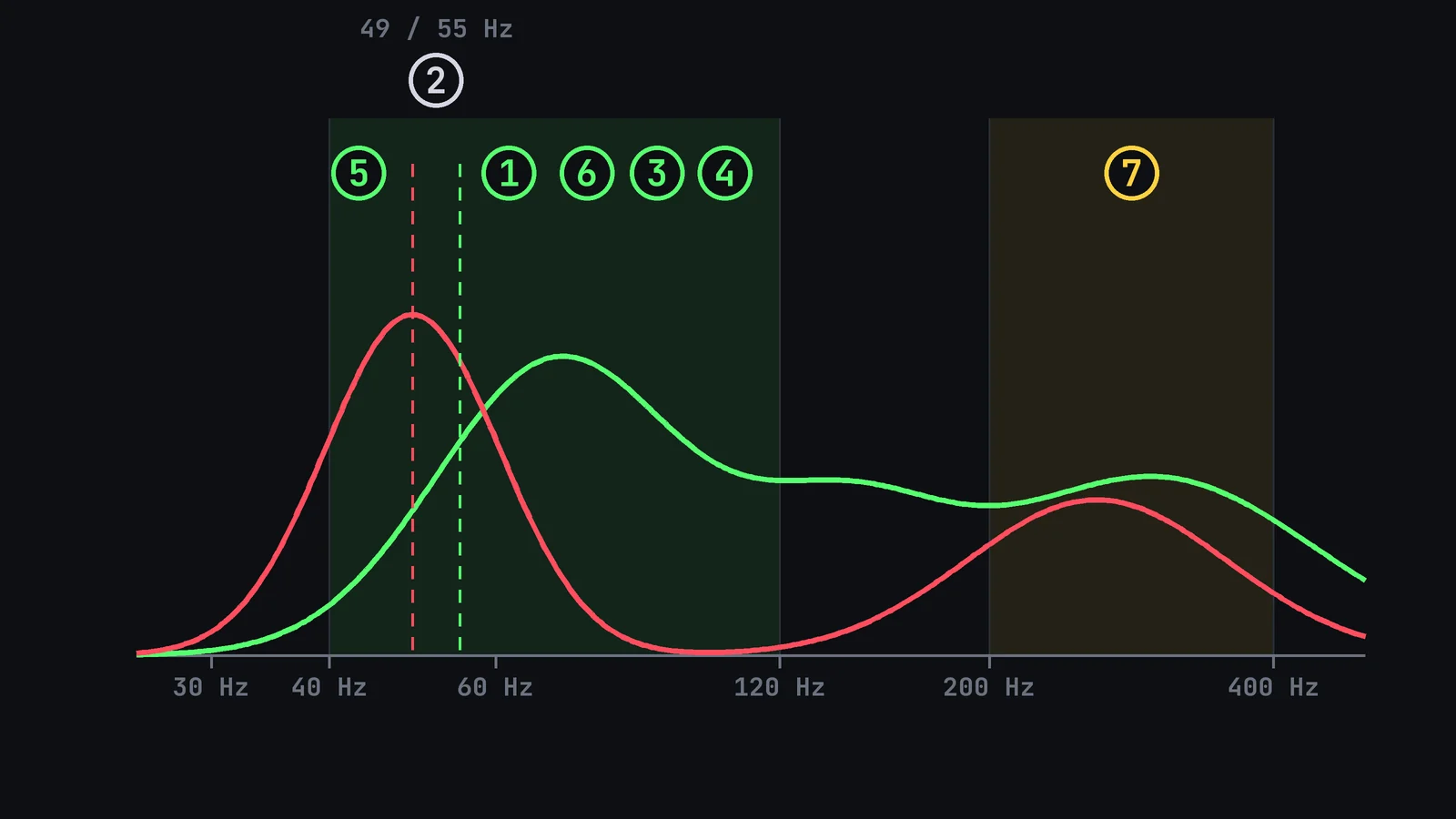
A kick has a pitch: the frequency its tail settles on. If that pitch is close to the bass note but not the same, the two beat against each other. The beating rate equals the difference between the two frequencies. A kick tail at G1 (49 Hz) under a bass on A1 (55 Hz) pulses 6 times per second, which you hear as a wobble in the low end.
The fix is to tune the kick: pitch it to the root of the track, or to a note that sits a fifth away from it, and check it on the notes the bass plays most. A tuner plugin on the soloed kick tail shows its pitch. If the bass moves a lot, a shorter kick tail (cause 6) clashes on fewer notes.
3. Bass Too Loud in the Sub
When the bass sits above the kick in the sub, the kick turns into a click on top of a wall of low end. A healthy balance is a kick a few dB louder than the bass, measured where each one plays. Kick & Bass Auto Mix aims for the kick about 3 dB above the bass in RMS.
On a high-tech minimal loop from my own productions, the bass was 2.5 dB louder than the kick before the mix. After AUTO MIX, the kick sat 3.0 dB above the bass, and the SCORE went from 61 to 81. Turning the bass down by ear works too: loop one bar, pull the bass fader until the kick leads, then bring it up until the bass feels full without covering the hit.
4. No Ducking
Even at the right level, a sustained bass fills the space where the kick should breathe. A sidechain ducks the bass under each kick and gives it back right after. The important part is where you duck: only the sub needs to move. If the whole bass ducks, the groove pumps; if only the bass below about 130 Hz ducks, the kick gets its room and the bass keeps its tone.
On the same high-tech minimal loop, the sub dropped 10.4 dB after each kick, with a release of 1/16 of a beat, synced to the tempo. How to set this up, by hand or automatically, is in Automatic Sidechain for Kick and Bass, Synced to Tempo.

5. Stereo Sub
Wide synth patches, chorus and stereo reverbs often put part of the sub on the sides. In stereo it sounds big. In mono, and on most club systems, the sides cancel and the low end changes or drops. The kick, which is usually mono, then sits against a bass that is a different size on every system.
Check it by switching the master to mono, or with a correlation meter on the bass. The fix is to keep the bass mono below about 120 Hz, with a mid/side EQ or a bass mono tool, and keep the width for the upper part of the bass.
6. Long Kick Tail Over a Rolling Bass
A rolling bass plays a note between the kicks, often on every 16th. At 125 BPM a 16th lasts 120 ms. A kick with a 300 ms tail then sits under two or three bass notes, and each one meets the tail at a different angle. The result is a heavy, smeared groove that no single setting fixes.
Shorten the kick tail so it ends before the next bass note, with a transient shaper or an envelope on the kick, or pick a tighter kick sample. Then align the phase per beat, because the notes that still overlap the tail each need their own angle. Rolling basslines are covered in Rolling Bass Phase Problems: How to Fix Them Fast.
7. Too Much 200 to 400 Hz on Both
Not every clash lives in the sub. The body of the kick and the upper harmonics of the bass both pile up between 200 and 400 Hz, and when both are full there, the mix sounds boxy and cloudy at any volume.
Decide which one owns that range. Usually the bass carries the notes there and the kick only needs a little body. Sweep a narrow boost on the kick to find the boxy spot, then turn it into a gentle cut of 2 to 4 dB. If the bass is the problem, a wide dip on the bass does the same job. Check in context, not in solo.
Quick Diagnosis Table
| Symptom | Likely cause | Fix |
|---|---|---|
| Kick gets thinner when the bass plays | 1. Phase | Ø test in mono, then phase rotation per beat |
| Wobble or pulse on long notes | 2. Kick out of key | Tune the kick to the root or a fifth |
| Kick sounds like a click on top | 3. Bass too loud | Kick a few dB above the bass in RMS |
| No gap after each kick | 4. No ducking | Sidechain the bass below 130 Hz only |
| Low end changes in mono or in the club | 5. Stereo sub | Bass mono below 120 Hz |
| Heavy, smeared groove | 6. Long kick tail | Shorter tail, then phase per beat |
| Boxy at any volume | 7. 200 to 400 Hz buildup | Gentle cut on whichever one does not own the range |
// Hear it
A Clash, Before and After
Press play and flip between BEFORE and AFTER on a techno loop from my own productions. Listen to the low end: in AFTER the kick comes through the bass instead of blurring into it.
Which Causes One Click Can Fix
Kick & Bass Auto Mix checks phase, level and ducking automatically. One AUTO MIX handles causes 1, 3, 4 and 5: it rotates the bass phase per beat, sets the kick over the bass, ducks only the bass below 130 Hz in time with the tempo, and makes the bass mono below 120 Hz when it has stereo content. The SCORE shows how far the result moved toward the reference ranges.
Causes 2, 6 and 7 are sound design choices, so they stay with you: tune the kick, pick its length, and decide who owns the low mids. The plugin only helps there in part, by aligning the beats that still overlap a long tail. The full one-click workflow is in Mix Kick and Bass Automatically: One Click, Real Numbers.
// Manual vs one click
Fixing It by Hand vs One AUTO MIX
| Manual | One click | |
|---|---|---|
| Phase | Ø test, then a rotator by ear | Rotated per beat, timing unchanged |
| Level | Faders, one bar at a time | Kick about 3 dB over the bass |
| Ducking | Sidechain routing and a drawn curve | Bass below 130 Hz only, synced to tempo |
| Stereo sub | Mid/side EQ or a mono tool | Bass mono below 120 Hz when needed |
| Kick tuning | Tuner and pitch by ear | Stays with you |
| Low mid mud | EQ cut on one of the two | Stays with you |
// Watch
Clashes Fixed on Real Loops
The walkthrough shows three of these causes fixed on real loops: phase per beat, the balance between kick and bass, and the sidechain.

Kick & Bass Mixed in ONE CLICK (Phase Alignment, Volume, Sidechain) | Kick & Bass Auto Mix VST3/AU
// Short clips
From Mud to Clear, in Short Clips
Short clips of the one-click fix on real loops.
// FAQ
Questions, answered
Why does my kick disappear when the bass plays?
Usually because the bass is too loud in the sub or the two are out of phase there. If the kick gets thinner even when both levels stay the same, it is phase. If the bass simply sounds bigger than the kick, it is level.
Should the kick or the bass be louder?
In most electronic music the kick leads by a few dB in the sub, measured where each one plays. Kick & Bass Auto Mix aims for about 3 dB of kick over bass in RMS.
Is a sidechain enough to stop the clash?
Not on its own. A sidechain makes room after each kick, but it cannot fix a phase cancellation at the moment they overlap, or a kick out of key. Fix phase and level first, then duck.
Should I cut the bass below the kick, or the kick below the bass?
Decide which one owns the lowest octave. Many producers keep the sub for the bass and give the kick a short, tight tail, or the other way round. Cutting both leaves the low end empty.
Why does my low end sound different in mono?
Part of the bass sub is on the sides, and the sides cancel in mono. Keep the bass mono below about 120 Hz and keep the width above it.
Do I need to tune my kick to the bass?
If the kick tail is long and you hear a wobble on held notes, yes. Tune the kick to the root of the track or to a fifth from it. With a short kick tail, tuning matters much less.

// Kick & Bass Auto Mix
Check Phase, Level and Ducking in One Click
Kick & Bass Auto Mix measures the bars you pick and fixes four of the seven causes at once, with a SCORE to show the result.
See the plugin
// About the author
// Keep reading